The scenario is that an Image that has its Stretch property set to None still has a different size from the original image source. You check the Padding, the Margin, the VerticalAlignment and HorizontalAlignment properties, you play with the RenderOptions and SnapsToDevicePixels and nothing seems to work. You specify the Width and Height manually and the image is clipped. The problem here, believe it or not, is that the DPI setting of the image source is different from the system DPI setting.

The solution is an ugly thing:

<Image
Stretch="Fill"
Width="{Binding RelativeSource={RelativeSource Self}, Path=Source.PixelWidth}"
Height="{Binding RelativeSource={RelativeSource Self}, Path=Source.PixelHeight}"/>
So set the Stretch to Fill so that it doesn't fill!

Here is the discussion where I got the solution from: How do I keep an image from being stretched when Stretch="None" doesn't work?.

The scenario is easy enough to create: make a Brush, use a Binding as the Color property, use your brush in your app, then start the application and change the system theme. An error "This freezable can not be frozen" will be triggered. The solution is to set x:Shared="False" for the brushes with color bindings.

An entire Microsoft Connect page is devoted to this issue, so get all the details there: Changing system theme throws "This freezable can not be frozen" exception

Update February 2016: The Microsoft Connect page has disappeared. Maybe it was because the bug was marked as "closed - by design", or some other Microsoft site revamp idiocy.

and has 0 comments
The Void Trilogy ends with The Evolutionary Void in a typical Hamiltonian way: completely off the scale science and fights, actions with galactic and universal implications and the bunch of special heroic people that lead the entire story to a climactic finish.

I couldn't wait for the last book of the trilogy to get out and I finally got hold of it, but more than a year had passed since reading the first two. Most of the characters I had to remember while reading the book, something that degraded a bit the reading experience. Take it as a hint: before starting a Peter F. Hamilton series of books, make sure they are all available before you start, as you can't let them out of your hands until you get to the end and the feeling of loss is horrible.

Now, about the book itself. The middle of the galaxy hosts an all devouring and unstoppable Void, inside which thought is the main law of physics and which feeds on the mass of the worlds outside in order to sustain itself. Basically, the heroes in the book are battling galactic cancer. The style of the narrative mixes incredibly advanced technology with an archetypal feudal heroic fantasy, bringing them flawlessly together at the end. Not everything makes sense, but then again, not everything could. Simple solutions to problems were available, but never explored, and some characters were popping in and out of the book stream like so many quantum fluctuations. But on the whole, it was a great reading, keeping me connected for the entire length and, unexpectedly judging by the Hamilton books I have read, with a good, satisfying ending.

Now, I plan on reading some non fiction books, then I will probably return to the Prince of Nothing universe. After that, who knows?

I had this control where a button was displaying a ContextMenu. I wanted to keep the ContextMenu open so I can manipulate its content. I had assumed that the StaysOpen property would do that for me; it did not. Also, I tried using a ContextMenuClosing event approach, only to discover that it is one of those rare "ing" events that doesn't have a Cancel property. I've looked in the sources of ContextMenu and Popup to see just what is going on and I have decided that the design was impossible to patch in order to get the behaviour I wanted.

In the end, the only solution I could find was to inherit from ContextMenu into a new class that would coerce the IsOpen property to true when StaysOpen is set to true. That did the trick. Here is the code:

public class StaysOpenContextMenu:ContextMenu
{
static StaysOpenContextMenu()
{
fixContextMenuStaysOpen();
}

private static void fixContextMenuStaysOpen()
{
IsOpenProperty.OverrideMetadata(
typeof(StaysOpenContextMenu),
new FrameworkPropertyMetadata(false, null,coerceIsOpen));
StaysOpenProperty.OverrideMetadata(
typeof(StaysOpenContextMenu),
new FrameworkPropertyMetadata(false, null, coerceStaysOpen));
}

private static object coerceStaysOpen(DependencyObject d, object basevalue)
{
d.CoerceValue(IsOpenProperty);
return basevalue;
}

private static object coerceIsOpen(DependencyObject d, object basevalue)
{
ContextMenu menu = (ContextMenu)d;
if (menu.StaysOpen)
{
return true;
}
return basevalue;
}

}


Hope it helps people out.

Update:

This solution only works for the body of the ContextMenu, the submenus are something else. However, the submenus are defined in the control template of a menu item, so that can be easily remedied by changing it to your needs. One quick and dirty solution would be to add a trigger that sets the IsSubMenuOpen property to true whenever StaysOpenOnClick is set. Or, if you simply want to freeze a menu in place, change the template so that the mouse click or hover will only trigger IsSubMenuOpen when the parent ContextMenu has StaysOpen to false, while the StaysOpen property of the MenuItem Popup is set to the ContextMenu StaysOpen.

and has 0 comments
A while ago I wrote a post detailing how to install Windows XP on a laptop with SATA drivers without using any floppy disk. Today I had to do such installation again and I've met with some annoying errors.

The laptop was an Acer Aspire, so I did everything in my old post and started the computer. It is important to use the correct drivers, as in my case the installation met with a blue screen with code 0x0000007B. It was like it tried to use some of the SATA drivers I had loaded on my WindowsXP CD, but not the right ones.

After the installation went ok, Windows XP would not boot up, not even in safe mode. In order to check what the hell is going on (because the default behaviour is to show a blue screen and immediately reboot) you need to start the computer and press F8, then disable the automated restart in case of error from the menu.

The problem is that the laptop had "AHCI mode" enabled in BIOS. Apparently, Windows XP doesn't support this mode. Set it to IDE BEFORE you start installing Windows XP. After that, you can enable AHCI after you install some stuff and change some registry entries, but it seems XP doesn't really have much use of this mode of access anyway. Here is a forum discussing this, but I haven't got around to trying the things described there yet.

Good luck with your installation. I almost went for installing Windows 7. Phew!

Ok, I am working on the blog to make it more accessible. I've replaced the template, I made all changes in the template from javascript and CSS, not by editing it and I've removed many of the things clogging the site. Not the cats and flies, though :) The light (low band) version of the site is not working anymore. If you want just the content, you can open the RSS feed.

I would like to know what you are thinking about the new look and I hope I will find the time to write interesting posts.


I almost expected the guy to be Canadian. :) This series of fantasy books is a masterpiece of writing. Not only it is complex of plot and emotion, but the characters are many, diverse and (most of all) different.

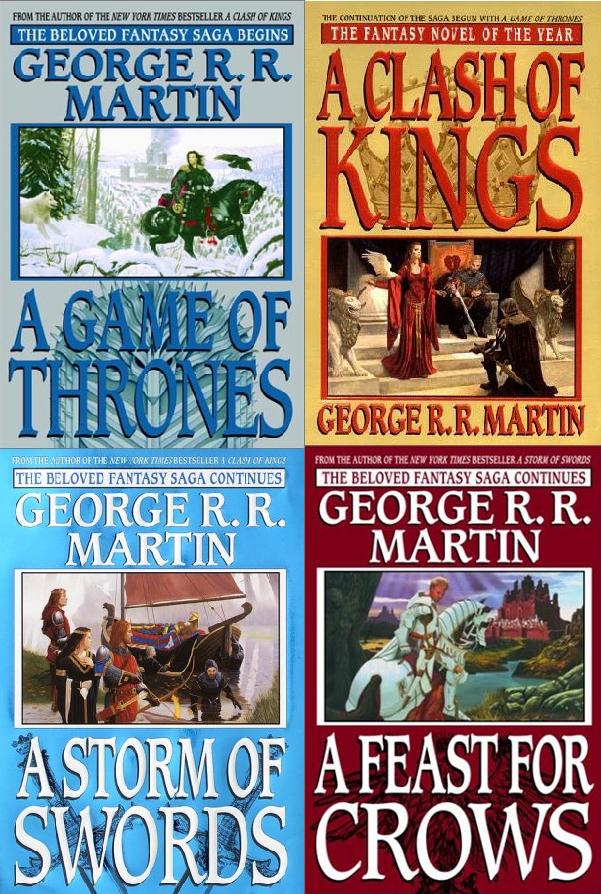
So far, the A Song of Ice and Fire saga, written by American author George R. R. Martin, consists of four books, the first published in 1996 and the last in 2005. At least three other books are planned in this series. The plot is a historical fantasy, but one unlike the books I've read recently. The aspects of magic and otherworldiness are rare, the bulk of the writing being about the feudal world, with kings, knights, low borns, maidens and whores, thieves, rapists and murderers, plotters and honorable men. No wonder that, lacking a lot of special effects, the story has been selected as the basis for a TV series.

But what is more important than anything is that the writing is really good. The characters are all human, with needs, desires, qualities and faults. You can't help but empathise with them, only to suffer at the cruel fate the writer bestows upon them. Not one escapes unscathed from the malice and pettiness of other people or from shere bad luck. You get to like the characters, then Martin fucks them up. I really wanted to use a more elevated language here, but it's the truth: the world he depicts seems horribly real, not a fairy tale of valiant white knights and pure maidens, but of ridiculous people grabbing lustfully whatever life offers them as it is unlikely their fortune is going to last long.

For the bad part, though, I think the author went too deep, got himself responsible for a lot of characters that he must now move forward, in gruesome detail. The fourth book became so large that he had to split it. He did so by character and geography, rather than by time, so a lot of the characters were missing from the fourth book, A Feast for Crows, and left for the fifth, but acting in the same timeline. At the end of A Feast for Crows the author explains his decision to not just split the book in the middle with a "To Be Continued" ending, and hopes for a publication of the second half in a year. That was in 2005. Ahem.

A lot of people are a bit confused by the long wait for the fifth book. Martin keeps making promises that he doesn't keep and, in July this year, he announced that A Dance with Dragons is already 1400 pages long and 5 chapters close to completion. I hope he does finish it quickly enough, although that would only prolong my suffering anyway. I am sure the fifth book will be as brilliant as the others, but then I will have to wait another 5 years for the sixth. I know TV series usually have no plot, but at least they come weekly ;)

Bottom line: The books are great, I recommend them to any lover of fantasy or even historical novels. I can hardly wait for the TV series, A Game of Thrones, as well.

and has 2 comments
While waiting for the tenth book in the Malazan Book of the Fallen saga, I went and read Prince of Nothing, by another Canadian author, R. Scott Bakker. This is a three book story, first published in 2004, about what I can only describe as a psychopath, member of a rationalizing sect, going out into the world to protect the secret of said sect.

The book is well written, although not nearly as brilliant as the Malazan series. However the subject of it is very interesting, at least from my standpoint. It concerns a human that is trained in the ways of mental manipulation, rationale and causality, something akin to the Vulcans from StarTrek, but with a very human side to it, the one that pushes one to amass power and use their knowledge to manipulate.

No wonder that the "prince of nothing" is the central character in the books, but not the main character, the role being left to a sorcerer, a man that is at the same time keeper of arcane knowledge and the scorn of ordinary humans. I can't help but empathize with the guy: basically a geek in love with a whore, while a psychopath destroys his world with insidious manipulation. ;)

There is another central character to the story, an insane barbarian, like a tortured Conan, who is both terrifyingly strong and ridiculously fragile, both a mindless warrior and a brilliant strategist. He is also, like Achamian the sorcerer, an exponent of humanity.

Prince of Nothing is a very smart book, one that can only get better as the writing skills of Scott Bakker improve. Its assets are both a scientific approach to the human psyche and a veritable intrigue of arcane powers in conflict with each other on the background of huge masses of clueless people. The plot itself is similar to the story in the Berserk manga, at least its start, where the strong warrior chooses to follow the charismatic and ambitious leader only to his doom. The moral, as I saw it, is that while we choose to live our lives with eyes closed, we cannot in good conscience pretend to deserve control over what happens to us.

I hope the series, known as "The Second Apocalypse", continues, since Prince of Nothing raised more questions than gave answers and the plot really caught my attention. A nice book that I warmly recommend.

I haven't been the most present of hosts, but then again, I haven't seen much interest for the collaboration page, with its open chat and whiteboard. Therefore I replaced the link to it with the Plugoo chat. The blog desperately needs some refactoring, but not likely that it will happend soon.

I was working on this application and so I found it easy to create some controls as UserControl classes. However, I realised that if I wish to centralize the styling of the application or even move some of the controls in their own control library with a Themes folder, I would need to transform them into Control classes.

I found that there are two major problems that must be overcome:

  1. the named controls in a user control can be accessed as fields in the code behind; a theme style does not allow such direct access to the elements in the control template.
  2. the controls that expose an event may not expose an associated command. In a user control a simple code behind handler method can be attached to a child control event, but in a theme a command must be available in order to be bound.


Granted, when the first problem is solved, it is easy to attach events in the code of the control to the child elements, but this presents two very ugly problems: the template of the control will need to contain the child elements in question and the event will not be declared in the theme, so the behaviour would be fixed as well.

I will solve the handling of events as commands by using a solution from Samuel Jack. The article is pretty detailed, but to make the story short, one creates an attached property for each of the handled events by using a helper class:


public static class TextBoxBehaviour
{
public static readonly DependencyProperty TextChangedCommand =
EventBehaviourFactory.CreateCommandExecutionEventBehaviour(
TextBox.TextChangedEvent, "TextChangedCommand", typeof (TextBoxBehaviour));

public static void SetTextChangedCommand(DependencyObject o, ICommand value)
{
o.SetValue(TextChangedCommand, value);
}

public static ICommand GetTextChangedCommand(DependencyObject o)
{
return o.GetValue(TextChangedCommand) as ICommand;
}
}

then by using a very simple syntax on the control that fires the event:


<TextBox ff:TextBoxBehaviour.TextChangedCommand="{Binding TextChanged}"/>


The problem regarding access to the elements in the template is solved by reading the elements by name from the template. In some situations, like when one uses a control as a source for a data control (like using a TreeView as the first item in a ComboBox), the approach will have to be more complicated, but considering the element is stored in the template of the control, something like this replaces the work that InitializeComponent does inside a UserControl:


[TemplatePart(Name = "PART_textbox", Type = typeof (TextBox))]
public class MyThemedControl : Control, ITextControl
{
private TextBox textbox;

public override void OnApplyTemplate()
{
base.OnApplyTemplate();
textbox = Template.FindName("PART_textbox", this) as TextBox;
}
...


The code is pretty straight forward: use the FrameworkTemplate.FindName method to find the elements in the OnApplyTemplate override and remember them as fields that you can access. The only weird part is the use of the TemplatePartAttribute, which is not mandatory for this to work, but is part of a pattern recommended by Microsoft. Possibly in the future tools will check for the existence of named elements in the templates and compare them against the ones declared in the control source.

The code of a demo project can be downloaded here.

Some other technologies I have used in the project:

  • the RelayCommand class, to make it easier to defined ICommand objects from code without declaring a type for each.
  • the AccessKeyScoper class that allows an IsDefault button to act locally in a panel.

If you google the net for using visual effects in WPF you are very likely to hit BitmapEffects. Well, bad news, BitmapEffect is obsolete and broken in WPF4. Instead you have Effect. The idea is to write (or download) a custom Effect for the things one would normally do using the slow (but easy to use) BitmapEffects. Also, the BitmapEffectGroup doesn't work anymore and has no alternative in WPF4. Bummer! According to Dr. WPF, the framework will try to automatically translate the older BitmapEffects to the new ones. That applies for BlurBitmapEffect and for DropShadowBitmapEffect with a Noise level of 0, for the others... you are on your own.

There were 5 default BitmapEffect classes in WPF3:
  1. BlurBitmapEffect - the WPF4 alternative is BlurEffect
  2. OuterGlowBitmapEffect - the WPF4 alternative in the Microsoft article is BlurEffect, but I have found that it can be replaced by DropShadowEffect with ShadowDepth set to 0
  3. DropShadowBitmapEffect - the WPF4 alternative is DropShadowEffect
  4. BevelBitmapEffect - the WPF4 alternative is a custom class inheriting from Effect.
  5. EmbossBitmapEffect - the WPF4 alternative is a custom class inheriting from Effect.


I found this project when googling to a simpler way of building ShaderEffects: WPF ShaderEffect Generator. Also, a discussion about a Bevel ShaderEffect here led me to this WPF shader library, but it's last release date is somewhere in March 2009.

I am using this WPF control that looks like a headered panel. On the header there is a menu, a button and then, underneath, some content that could be anything. I had this request that, when using the Tab key to navigate, the focus should first come to the button, which is not the first control in the header, then jump to the controls in the content and then jump back to the menu. In other words, to make the menu the last controls that can be reached via the Tab key inside this WPF control.

Well, in WPF there is this class called KeyboardNavigation which has some very useful attached properties: TabIndex (which defaults to int.MaxValue) and TabNavigation (which defaults to Continue). As in Windows Forms, one needs to set the TabIndex to control the navigation order, but the TabNavigation property makes it a lot more versatile and clear as well. In my case, I had to do the following:
  1. Set the entire panel control to KeyboardNavigation.TabNavigation=Local. That allowed me to control the tab index inside the control, otherwise the TabIndex value would have been global to the window
  2. Set the TabIndex of the button to 1. That made the button the first thing to be selected in case I use Tab to navigate in the panel
  3. Set the TabIndex of the content to 2. This set the controls in the content as the next controls to be accessed via the Tab key
  4. Set the TabNavigation value of the content to Local. Without this, the TabIndex value would have made no sense. First of all the content panel has IsTabStop to false and, second, any control inside it would have int.MaxValue set as TabIndex which would work globally in the main control.


This example should make it clear how to use the KeyboardNavigation properties. There is one more, called ControlTabNavigation, which has a misleading name and an ambiguous description. It is not related to a control, the Control in the name comes from the Ctrl key. In WPF one can use Ctrl-Tab to navigate an alternative order thus allowing, in this case, to go directly to the menu, then the button and then the controls in the content area.

I was trying to use a static class of attached properties that I would use inside my WPF control templates, so that every time I need to change them I would only use a setter, not copy paste the entire template and make minute changes. It worked great and I recommend this solution to everybody. So after the refactoring of my control I was shocked to see that in the production application, all my attached properties were throwing binding errors!

The solution was to explicitly use the Path= syntax in the bindings.

{Binding Path=(namespace:ClassName.Property)...
not
{Binding (namespace:ClassName.Property)...

The strange thing is that in the test application everything worked great, so what went different? Apparently the problem is that IXamlTypeResolver (used in PropertyPath) is not finding namespaces unless already registered, as explained here by Rob Relyea. The dude with that Lovecraftian name is the program manager for the WPF & Xaml Language Team.

So if one uses the namespace of the attached property before in some other context or by using the verbose syntax before, it works even with the Path keyword omitted. Not really sure why the verbose syntax works differently though.

Many a time I want that textblocks that get trimmed to display their text as a tooltip. For that, I would make a trigger to set the Tooltip value to the Text value if the textblock has been trimmed. The problem is that there is no property that shows if this is the case.

Googling a bit, I found this article, which apparently works, but also has some problems, as reported by many commenters. Even if it would have worked perfectly, my scenario is too simple to need all that code.

The idea of the original post is simple and I like it, the problem being that convoluted method that computes the width of the text in the textblock. Why would I want to redo all the work that is being done by the framework itself? The width of a textblock with TextWrapping NoWrap should be textBlock.Measure(Size(double.MaxValue,double.MaxValue)). I am sure a more complex scenario can also be serviced by this method, if the height is taken from the TextBlock, but I don't need it.

So here is the entire class, using my measuring method:
public class TextBlockService
{
static TextBlockService()
{
// Register for the SizeChanged event on all TextBlocks, even if the event was handled.
EventManager.RegisterClassHandler(typeof (TextBlock),
FrameworkElement.SizeChangedEvent,
new SizeChangedEventHandler(OnTextBlockSizeChanged),true);
}

public static readonly DependencyPropertyKey IsTextTrimmedKey =
DependencyProperty.RegisterAttachedReadOnly(
"IsTextTrimmed",
typeof (bool),
typeof (TextBlockService),
new PropertyMetadata(false)
);

public static readonly DependencyProperty IsTextTrimmedProperty =
IsTextTrimmedKey.DependencyProperty;

[AttachedPropertyBrowsableForType(typeof (TextBlock))]
public static Boolean GetIsTextTrimmed(TextBlock target)
{
return (Boolean) target.GetValue(IsTextTrimmedProperty);
}

public static void OnTextBlockSizeChanged(object sender, SizeChangedEventArgs e)
{
TextBlock textBlock = sender as TextBlock;
if (null == textBlock)
{
return;
}
textBlock.SetValue(IsTextTrimmedKey, calculateIsTextTrimmed(textBlock));
}

private static bool calculateIsTextTrimmed(TextBlock textBlock)
{
double width = textBlock.ActualWidth;
if (textBlock.TextTrimming == TextTrimming.None)
{
return false;
}
if (textBlock.TextWrapping != TextWrapping.NoWrap)
{
return false;
}
textBlock.Measure(new Size(double.MaxValue, double.MaxValue));
double totalWidth = textBlock.DesiredSize.Width;
return width < totalWidth;
}
}


This would be used with a trigger, as I said at the beginning of the post:
<Style TargetType="{x:Type TextBlock}">
<Setter Property="TextTrimming" Value="CharacterEllipsis"/>
<Style.Triggers>
<Trigger Property="Controls:TextBlockService.IsTextTrimmed" Value="True">
<Setter Property="ToolTip" Value="{Binding Text,RelativeSource={RelativeSource Self}}"/>
</Trigger>
</Style.Triggers>
</Style>

Today a power outage screwed something in my Visual Studio installation. For the life of me I couldn't figure out what went wrong and I also didn't have the time to properly investigate. The issue appeared when I restarted the computer, ran Visual Studio 2010, loaded a project (any project) and tried to compile. Invariably, an error would prevent me from building the project:Error 22 A problem occurred while trying to set the "Sources" parameter for the IDE's in-process compiler. Error creating instance of managed object 'Microsoft.VisualStudio.CSharp.Services.Language.Features.EditAndContinue.EncState' (Error code is 0x80131604). Application.

I have tried disabling Edit and Continue, I've tried to disable the Exception Assistant and also I've re-registered the dlls in the Visual Studio 10.0/Common7/IDE folder, all to no avail. Even worse, it seemed as I am the only person on Google (yay!) that got this error so I couldn't find a quick no effort solution (boo!). The error code 0x80131604 stands for HRESULT COR_E_TARGETINVOCATION, or a TargetInvocationException, which is thrown by methods invoked through reflection. So that is that.

The solution was to reinstall Visual Studio. It took half a day, but it fixed it. If you have met the same issue and you found a quicker way, please leave a comment.